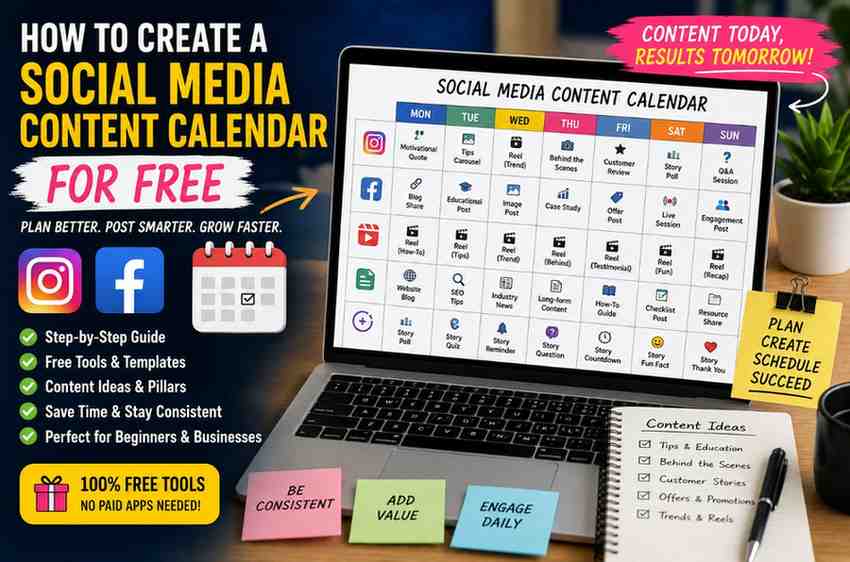
You sit down to post on Instagram or Facebook… and suddenly your mind goes blank.
“What should I post today?”
Honestly, most small business owners in India struggle with this daily. One week they post regularly. The next week their page becomes silent because they run out of ideas.
That’s exactly why learning how to create a social media content calendar for free can completely change your consistency online.
A proper content calendar saves time, reduces stress, and helps you post with purpose instead of randomly uploading content whenever you remember.
The best part? You don’t need expensive software.
You can build an effective social media plan using completely free tools.
Why You Need a Social Media Content Calendar
Posting randomly usually creates random results.
Some days you may upload three reels. Then disappear for two weeks.
That inconsistency hurts engagement badly.
Social media platforms reward creators and businesses that post regularly. More importantly, your audience starts trusting your brand when they see consistency.
What a Content Calendar Helps You Do
- Plan posts in advance
- Maintain consistency
- Reduce last-minute stress
- Organize campaigns better
- Track content ideas
- Improve engagement
I’ve personally seen small businesses become far more active online simply because they planned content weekly instead of daily.
How to Create a Social Media Content Calendar for Free Step by Step
You don’t need complicated systems.
Simple works surprisingly well.
Let’s break the process down into manageable steps.
Step 1: Decide Your Content Goals First
Before creating any calendar, ask yourself one question:
“What is the purpose of my content?”
Many people skip this part and end up posting random motivational quotes that have nothing to do with their business.
Common Social Media Goals
- Increase followers
- Generate leads
- Build brand awareness
- Drive website traffic
- Get local customers
- Increase product sales
Your goals influence the type of content you create.
For example, a local bakery may focus on product photos and customer reactions, while a digital marketer may focus more on educational reels.
Step 2: Choose Your Content Pillars
Content pillars are the main topics your page talks about regularly.
Without content pillars, your page can feel messy and confusing.
Example Content Pillars for a Small Business
- Educational tips
- Behind-the-scenes content
- Customer testimonials
- Product promotions
- Trending reels
- Personal stories
I usually recommend choosing 3 to 5 main pillars.
Too many topics make planning harder.
Step 3: Use Free Tools to Create Your Content Calendar
You absolutely do not need premium software when starting.
Many free tools are more than enough.
Best Free Tools for Content Calendars
- Google Sheets
- Notion
- Trello
- Canva Planner
- Google Calendar
Personally, I still like Google Sheets for beginners because it’s simple and easy to update from mobile.
You can also collaborate with team members easily.
You can explore free productivity ideas from HubSpot and content planning tips from Neil Patel.
Step 4: Plan Content Weekly Instead of Monthly
Many people try planning an entire month immediately.
That often becomes overwhelming.
Weekly planning feels more realistic, especially for beginners and small businesses.
Simple Weekly Posting Structure
- Monday – Educational tip
- Tuesday – Reel or trend
- Wednesday – Customer review
- Thursday – Behind the scenes
- Friday – Promotional content
- Saturday – Personal or relatable post
- Sunday – Engagement story or poll
Having a structure reduces decision fatigue.
You stop wasting energy wondering what to post every day.
How to Create a Social Media Content Calendar for Free Without Burning Out
Here’s something most social media advice completely ignores.
You do not need to post nonstop to grow.
Many creators burn out because they try copying huge influencers posting five times daily.
Consistency matters more than volume.
A Better Approach
If you can realistically post:
- 3 reels weekly
- 2 stories daily
- 1 carousel weekly
…that’s already enough to build momentum.
A sustainable content calendar always works better than an unrealistic one.
Quick Tip: Plan your content around your actual lifestyle and workload. A calendar you can follow consistently is far more valuable than an “ideal” plan you abandon after one week.
Step 5: Batch Create Your Content
One of the smartest things you can do is batch content.
Instead of creating posts daily, create multiple posts in one sitting.
I personally save a huge amount of time this way.
Example Batch Workflow
- Monday: Script ideas
- Tuesday: Shoot reels
- Wednesday: Edit videos
- Thursday: Write captions
- Friday: Schedule posts
Batching reduces stress because you are not constantly switching tasks.
Step 6: Add Important Dates and Trends
Your calendar should include:
- Festivals
- National holidays
- Trending events
- Product launches
- Seasonal campaigns
Indian audiences engage strongly with seasonal and festival-based content.
Diwali, Pongal, Eid, IPL season, Independence Day — all these create engagement opportunities.
Real Example
A local clothing store in Coimbatore increased Instagram reach massively during Pongal simply by posting relatable festive reels consistently for one week.
Timing matters.
Step 7: Use AI Tools Carefully
AI tools can help speed up content planning.
But blindly copying AI-generated captions makes content feel robotic.
Use AI for:
- Idea generation
- Caption drafts
- Hook suggestions
- Hashtag ideas
- Content brainstorming
Then edit everything in your own voice.
Indian audiences connect more with relatable and natural content than perfectly polished corporate-style writing.
Step 8: Keep Space for Real-Time Content
Not every post should be pre-planned.
Some of the best-performing content happens spontaneously.
Trending audio, breaking news, viral memes, customer moments — these often perform better because they feel timely.
Balance Matters
I usually recommend:
- 70% planned content
- 30% flexible content
Your calendar should guide creativity, not trap it.
Step 9: Track What Actually Performs
Many people create calendars but never study results.
That’s a missed opportunity.
Important Metrics to Watch
- Reach
- Saves
- Shares
- Comments
- Follower growth
- Watch time
You’ll slowly notice patterns.
Maybe reels outperform carousels. Maybe educational posts get more saves. Maybe your audience responds better to Tamil captions.
Use those insights to improve future calendars.
Step 10: Don’t Obsess Over Perfection
Honestly, many small business owners overthink content too much.
They delay posting because they want everything perfect.
Meanwhile, competitors keep posting consistently and growing faster.
Social media rewards momentum.
Imperfect content published consistently usually beats perfect content stuck in drafts.
One Thing Most Content Calendar Guides Don’t Talk About
Here’s something I’ve personally observed while managing pages.
The best content calendars are not the prettiest spreadsheets.
They’re the calendars that reduce mental stress.
Many business owners secretly hate social media because it feels chaotic and never-ending.
A good calendar creates mental clarity.
You stop panicking daily about what to post. Your brain gets more space to focus on creativity and business growth.
That psychological benefit matters more than most people realize.
Common Mistakes When Creating a Content Calendar
Avoid These Problems
- Planning too much content at once
- Ignoring analytics
- Posting only promotional content
- Not adapting to trends
- Creating unrealistic schedules
- Copying competitors completely
Your calendar should fit your business personality and audience.
Helpful Resources for Social Media Marketing
If you want more help with online growth strategies, check out our:
Final Thoughts
Learning how to create a social media content calendar for free can completely change the way you manage your online presence.
You become more organized. More consistent. Less stressed.
And honestly, consistency alone already puts you ahead of many competitors.
Start simple.
You do not need expensive tools, massive teams, or fancy workflows.
Even a basic Google Sheet with weekly content ideas can improve your social media growth dramatically.
Plan smarter. Post consistently. Keep improving.
Your future audience is already online waiting to discover your content.
Need Professional Social Media Help?
Get Free SEO Help from a Coimbatore Digital Marketing Expert